AI automation for small businesses pays back first on tasks that are frequent, rule-bound, cheap to get wrong and fed by data you already hold. It does not pay back on vague ambitions such as “use AI in sales”. This guide gives four tests for picking the first task, a ranked list of candidates, the tasks to leave alone, and the controls to write down before anything goes live.
What AI automation for small businesses actually is
Plain automation moves data between tools on fixed rules: a form arrives, a row is created, an email goes out. AI adds one step that plain rules cannot do, such as reading an unstructured message and deciding what it is about, or drafting a reply.
Rippling’s overview treats the two together. It lists connectors such as Zapier and Make for moving data between apps, then adds AI-powered automation as a newer layer. That layering is the useful mental model. Most good AI automation for small businesses is a normal workflow with one AI step inside it, not an autonomous agent running the company.
Why does this matter? Because the plain part of the workflow is where reliability comes from. The AI step supplies judgment on messy input. Everything around it should stay boring and testable.
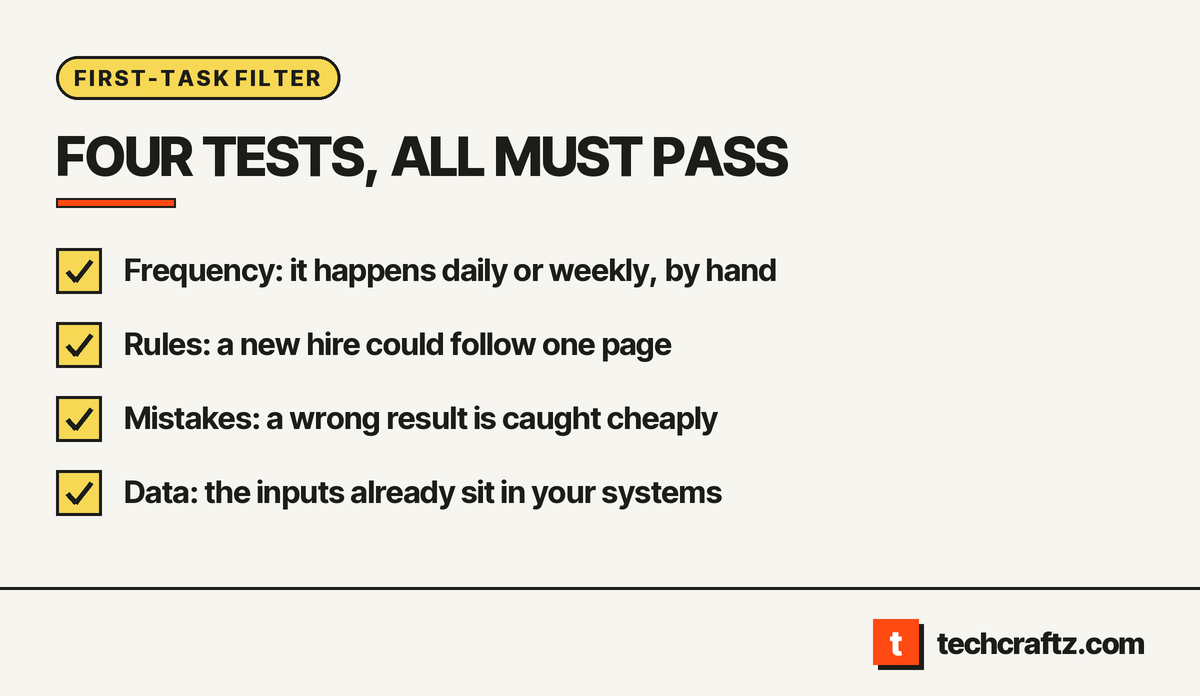
Four tests to find the first task
Vendor guides list use cases by department. KATPRO names sales and marketing, customer support, finance and accounting, HR and operations. Flowlu lists six ways, from customer service to data analysis. Those lists tell you where AI is used. They do not tell you which task to start with. The four tests below are our editorial judgment, not an industry standard.
| Test | The task passes when | The task fails when |
|---|---|---|
| Frequency | It happens every day or every week, and someone does it by hand | It happens a few times a year |
| Rules | A new hire could do it from a one-page instruction | The answer depends on unwritten judgment or politics |
| Cost of a mistake | A wrong result is caught and fixed cheaply | A wrong result reaches a customer or a regulator unseen |
| Data | The inputs already sit in a system you control | The inputs live in heads, paper or a tool with no export |
Score each candidate task pass or fail on all four. The first task to automate is the one that passes all four and annoys your team most. Measure the baseline yourself first: how many minutes it takes now, how often, and who does it. That is the only payback figure that applies to your business, and no vendor can supply it.
Tasks that usually pass, in rough order
The order below is our judgment for AI automation for small businesses in general. Reorder it for your business.
- Inbound message triage. An AI step reads each enquiry, labels it (quote request, support, spam) and routes it to the right person with a short summary. The human still replies.
- Data entry from documents. Invoices, forms or emails are read, fields are extracted, and a person confirms before the record is saved.
- Follow-up and reminders. Appointment confirmations, overdue-task nudges and “did you receive it” messages built from templates, with AI only choosing which template fits.
- First-draft replies. A support answer is drafted from your own help pages and past answers. A person edits and sends.
- Report assembly. Numbers from two or three tools are pulled together weekly, with a short written summary for a person to check.
Every item on that list keeps a human in the loop at the point where a mistake would cost something. That is the pattern.
Tasks that fail the tests
Some tasks look attractive and fail on the cost of a mistake.
- Decisions about individuals with legal or similarly significant effect. GDPR Article 22 gives people the right not to be subject to a decision based solely on automated processing, including profiling, when it produces legal or similarly significant effects. It allows exceptions, such as contract necessity or explicit consent, and then requires safeguards: at least the right to human intervention, to express a view and to contest the decision. Think hiring screens or account closures. Keep a person in charge.
- Anything nobody can describe in a page. If your most experienced employee cannot explain the rule, a model will not discover it for you.
- Rare, high-stakes work. A task done twice a year will never repay the build.
This is not legal advice. Whether GDPR applies to you is a question for counsel.
Put the human step and the log in the scope
For AI automation for small businesses, write three things into the scope before building:
- A review queue. Low-confidence or unusual items go to a person, with the AI’s reasoning visible.
- A log. Every input, output and human decision is stored, so errors can be traced and fixed.
- A switch. One setting turns the AI step off and falls back to the manual process.
A software discovery phase is the natural place to write these down, along with the rules from the second test.
Three risks to name in a contract
Disclosure. Article 50(1) of the EU AI Act says providers must design systems that interact directly with people so those people are informed they are dealing with an AI system, unless that is obvious from the context. If a chatbot or auto-reply fronts your business, plan the disclosure line now. Check which obligations apply to you and from when.
Data handling. If an AI vendor processes your customers’ personal data on your behalf, GDPR Article 28 requires that the processing be governed by a binding contract. Ask where the data goes, whether it is kept, and who the sub-processors are.
Security of the AI step itself. OWASP publishes a Top 10 for LLM applications (2025 edition). Two entries matter early for small workflows: LLM01 Prompt Injection, where user input alters the model’s behavior, and LLM06 Excessive Agency, where an LLM-based system is granted more ability to act than it needs. In practice: an email the AI reads must never be able to trigger a refund, and the AI step should hold the narrowest permissions that work.
Buy, wire together or build
You may not need custom software. For AI automation for small businesses, many first tasks are solved by connecting tools you already pay for.
| Situation | Lean toward |
|---|---|
| One task, standard apps, low volume | A connector tool, set up in-house |
| Several tools, branching rules, retries, an audit trail | A workflow engine, built and documented for you (comparison) |
| The process is your edge, or data must stay in your systems | Custom build (why teams choose it) |
If the work needs an AI step with review queues and logs, our AI automation services cover that scope. The same page covers the plain integrations around it.
A sensible first pass
A first pass at AI automation for small businesses stays small. Pick one task that passed all four tests. Write the rules on one page. Run the AI step in shadow mode, so it produces answers that people compare with their own and nothing is sent. Fix what differs. Then switch on the review queue, not full autopilot. Extend only when the log shows the errors are rare and cheap.
Send the brief, get a written scope
techcraftz puts scope, milestones and the estimate in writing before the first line of code, then hands over the code, the accounts and the keys. For AI automation for small businesses, the brief is one workflow: what arrives, what should happen, who reviews it. Back to the techcraftz overview if you want to see how we work first.
Send the brief and get a written scope for one workflow.
Last checked: October 14, 2026. Regulations and vendor guidance change; verify before you commit.
Talk to us about your project
Tell us what you need. We help you scope the build, the milestones and a realistic estimate.
View services