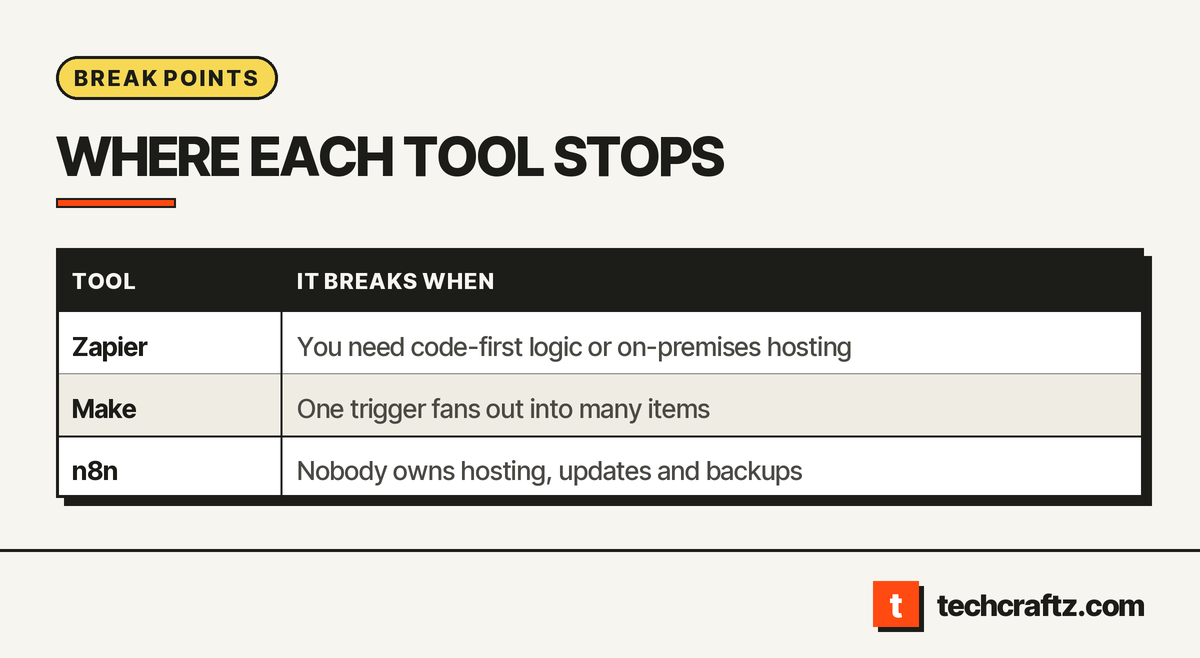
In the n8n vs Zapier vs Make decision, each tool breaks in a different place. Zapier is simple to start, even by n8n’s own account, and is managed for you, but it is limited for deep custom logic and for on-premises needs. Make counts every run of every module, so one trigger that fans out into many items can surprise you. n8n gives you code and control, and gives you the upkeep and a licence to read. This article compares how they count work, who runs them, and where each stops.
n8n vs Zapier vs Make in one table
Most comparisons of n8n vs Zapier lead with plans and fees. We leave those out, since they change often and depend on your volume. The table uses each tool’s own documentation or comparison page, and marks claims that a competitor makes about another tool.
| Zapier | Make | n8n | |
|---|---|---|---|
| What counts as usage | Each successful action step is a task | Each module run is an operation, once per item processed | Per workflow execution, according to Zapier’s comparison page |
| Who runs it | Zapier, fully managed | Make’s documentation does not cover this; check before you compare | You, if self-hosted; your team owns setup, updates and uptime |
| Code in a step | Limited; Code by Zapier exists | Not covered by the sources we read | JavaScript or Python at any step, per n8n |
| Licence | Not open source, per Cipher Projects | Not covered by the sources we read | Sustainable Use License, source-available |
| Admits it is weaker at | Code-first and on-premises cases (Zapier’s own words) | Not covered by the sources we read | Steeper learning curve (Zapier’s claim) |
In this n8n vs Zapier comparison, treat the n8n column as a mix of the tool’s own claims and a rival’s. Zapier is the source for the “per execution” and “steeper learning curve” cells. n8n’s own page describes Zapier as simple to start, with a trade-off in flexibility for complex logic. In the n8n vs Zapier argument, each side says the other is the compromise.
Counting is the hidden difference
In any n8n vs Zapier vs Make choice, the three tools do not count work the same way, and that decides whether a workflow stays simple to run.
Zapier counts a task for every successful action step. Zapier’s help page says triggers, Filter steps, Paths steps and any step that errors or halts do not count. A full replay does count again, since previously successful steps that rerun are counted.
Make counts an operation each time a module runs. (Its documentation is the only source here for how it counts.) A module runs once per item, which Make calls a bundle. So Make’s documentation points out that bundles in earlier modules multiply the operations in the rest of the scenario. In its own example, sending 5 emails is 5 operations. A trigger module counts once per check, whatever it returns. Make’s page also shows a second usage figure beside each operation count, so check how your plan converts operations into its billing unit.
n8n, per Zapier’s page, bills per execution of a workflow. That is the rival’s description of it, so confirm with n8n. Self-hosting changes the question from “how many runs” to “what does it take to keep the server running.”
An example makes the difference concrete. Picture a workflow that reads a batch of new orders and then updates a sheet and sends a message for each one. In Make, every order sends the following modules through another run. In Zapier, every successful action counts. Neither is wrong. They reward different shapes of workflow, so model your busiest day before you choose.
Zapier break points
- Custom logic. n8n argues that building highly customized or complex logic in Zapier can become challenging. Zapier itself says it cannot fully replace n8n in code-first cases.
- On-premises requirements. Zapier’s page names automations that must run in a self-hosted, air-gapped or on-premises environment as a case it cannot cover.
- Replays and retries. Because a full replay counts previously successful steps again, a noisy workflow weighs more on your usage count while you debug it.
- Moving away. Zapier notes that switching tools means recreating workflows, reconnecting accounts and retesting each automation.
Make break points
- Fan-out. A trigger that returns many items multiplies the operations of every later module. Sketch the item counts before you build.
- Stopping mid-run. Make’s documentation says that when you stop a running scenario, the current module must finish processing all of its items first, so a stop is not instant.
- Thin independent coverage. In four comparison pages we read, Make is barely discussed, and one defers to a separate guide. We found no neutral account of its limits beyond its documentation, so test it on your own workflow.
n8n break points
- You own the operation. Zapier’s comparison, which is a rival’s view, says self-hosting means your team handles setup, updates, backups, monitoring and security. Even if that framing is competitive, it is accurate that nobody else will patch your server.
- The licence limits reuse. n8n’s repository says its code is under the Sustainable Use License. You may use or modify it only for your own internal business purposes or for non-commercial use, and files marked “.ee.” need an Enterprise licence. Building a product for clients on top of it needs a licence check first. n8n calls itself fair-code and source-available, not open source.
- Long jobs. n8n’s documentation shows the workflow timeout defaults to no limit and can be set per instance and per workflow. On a self-hosted server that is useful, and it is also yours to configure.
- Learning curve. Zapier says common actions often need expressions or code nodes. A team with no developer may find that a barrier.
A decision path for n8n vs Zapier vs Make
- No developer, standard apps, no on-premises need. Start with Zapier or Make, and model the busiest day for the counting rules above.
- Branching over lists of items. Make fits, as long as you estimate the fan-out.
- A developer on the team, custom APIs, a need to run in your own environment. n8n fits, with a named person for upkeep.
- You will resell or embed the tool. Check the licence of whichever you pick before you start.
Whichever you pick, write down who owns the accounts, where credentials are stored, who receives the failure alert, and how you would export the workflows. These are the same ownership questions we ask of any software; the custom software development process describes them in full.
The tool as the wrong layer
Automation tools are fine for glue between standard apps. A workflow becomes software when it holds business rules nobody can explain, when its failure stops the business, or when it needs an audit trail. At that point a small custom service with a proper API, tests and an owner can be easier to run than a diagram of forty steps. Piles of undocumented workflows also create the maintenance burden described in our article on technical debt, and our guide to when custom software beats off-the-shelf covers the build-or-buy decision. Our API development page describes the building side.
Send the brief, get a written scope
techcraftz puts scope, milestones and the estimate in writing before the first line of code, then hands over the code, the accounts and the keys. If you want help choosing or replacing an automation setup, see our AI automation services page, send the brief, or read more about techcraftz.
Last checked: October 14, 2026. Counting rules and licence terms change; confirm them on each vendor’s current documentation.
Talk to us about your project
Tell us what you need. We help you scope the build, the milestones and a realistic estimate.
View services