AI automation examples are easiest to judge when you see where the AI sits. Zapier describes AI automation as AI models making decisions, extracting information or generating content inside the workflows a team already runs. The model handles the messy part, such as reading an email or sorting a ticket. Plain rules handle everything else, and a person checks what is risky. This guide gives eight patterns with those three roles marked, then the limits and governance checks. These AI automation examples are patterns, not client stories. Sources were checked on October 15, 2026.
AI automation examples start with the shape of the workflow
Every example below has the same skeleton.
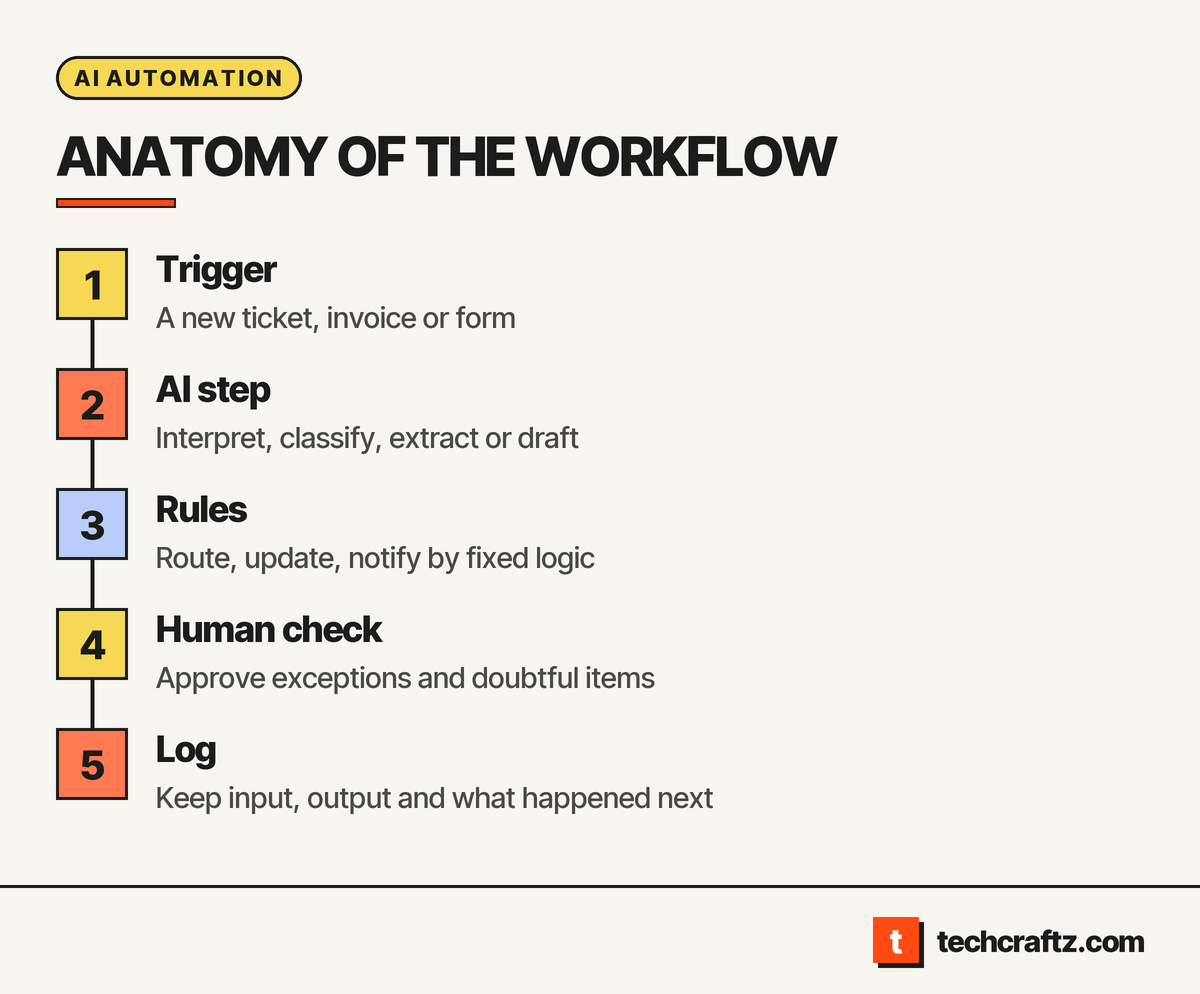
Zapier’s advice on getting started says not every step needs a model: AI adds value where there is something to interpret, classify, generate or extract, and everything else can stay deterministic, which keeps the workflow cheap and predictable. Sotatek, a software development firm, sorts use cases into four jobs for the AI: interpreting messy input, supporting a decision, handling exceptions and predicting what comes next. Keep those four verbs in mind when you read any list of AI automation examples. If the step you want to automate is not one of them, you probably need plain rules, not a model.
Eight AI automation examples with the human step marked
| Pattern | The AI does | Plain rules do | A person checks |
|---|---|---|---|
| Support ticket triage | Reads the message, classifies the topic and urgency | Routes to the right queue, sets the response target | Urgent and low-confidence tickets |
| Invoice data capture | Extracts supplier, dates and line items from PDFs and emails | Validates fields, matches to existing records, posts to the system | Mismatches and unreadable files |
| Lead qualification | Reads the enquiry and summarizes what the buyer wants | Applies your fit criteria, assigns an owner | Any lead the rules reject |
| Policy questions for staff | Answers from approved documents and cites them | Limits access by role | Questions with no source found |
| Document summaries | Condenses long reports or contracts into a brief | Files the summary with the original | The summary before anyone acts on it |
| Content repurposing | Drafts social posts from a published article | Schedules and posts to set channels | Every draft before it goes out |
| IT and HR requests | Identifies the request type and proposes a first reply | Opens the ticket, applies the standard steps | Anything touching access or pay |
| Order exceptions | Reads the written notes on a delayed or changed order | Updates status and notifies the customer for known cases | Cases the rules do not recognize |
The first examples line up with published ones. Zapier describes AI triage of support tickets and of urgent calls for law firms. Moveworks lists answering employee questions about policy, reviewing and approving expenses, IT troubleshooting, summarizing long PDFs and qualifying leads. Sotatek’s four jobs map onto the table: interpretation in invoice capture and summaries, decision support in qualification, exception handling in orders. Kognitos groups examples under customer service, finance, HR, supply chain and compliance.
The “person checks” column is ours. The sources describe what the AI does. They say less about who signs off, which is where most real projects are decided.
How to read these AI automation examples
Published cases are written by tool vendors, and many come with large percentages: tickets resolved automatically, hours saved, revenue recovered. We do not repeat them. Each figure is self-reported, tied to that company’s own baseline, and tells you little about your volumes. What does transfer is the structure:
- A trigger you can name. A new ticket, a received invoice, a form submission.
- A narrow job for the model. One classification or one extraction, not “handle support”.
- Rules around it. Routing, thresholds and fallbacks written down, not prompted.
- A threshold for human review. What is automatic and what needs a person, decided before launch.
- A log. The input, the model’s output and what happened next, so you can find the failures.
Gumloop’s advice on implementation agrees on the groundwork: write down every step of a typical workflow and list the edge cases before you automate anything. That documentation is the real starting point, and our software requirements guide shows how to capture it.
Where AI is the wrong tool
Sotatek lists four mistakes that appear in many projects.
- Automating an unstable process. If it changes weekly, automation becomes maintenance. Stabilize the workflow first.
- Weak data. Inconsistent inputs and unreliable labels produce unreliable outputs. Fix definitions and ownership before expecting accuracy.
- Expecting full automation at once. Sotatek says many high-value use cases start as “assist and recommend”, then become partial automation, then controlled autonomy as confidence grows.
- Leaving governance for later. Security, compliance and audit needs belong in the first production release.
Add a fifth from the table above: if a fixed rule can do the job, use the rule. A spreadsheet formula or an “if” step is cheaper, faster and easier to explain than a model.
Governance checks before any of them go live
Three public references cover most of what a first project needs to decide.
- Decisions about people. Article 22 of the GDPR gives data subjects the right not to be subject to a decision based solely on automated processing, including profiling, that produces legal effects or similarly significantly affects them. There are exceptions, with safeguards such as human intervention. Lead scoring and HR triage can touch this. Ask what decision the output feeds, and whether a person reviews it.
- Telling people they are talking to AI. Article 50(1) of the EU AI Act says providers must ensure that AI systems intended to interact directly with people are designed so that those people are informed they are interacting with an AI system, unless that is obvious to a reasonably well-informed, observant person. Who counts as the provider, and what applies from when, needs checking with counsel for your case.
- Giving the model too much power. OWASP’s Top 10 for LLM applications 2025 includes excessive agency and prompt injection among its entries. The practical rule: the model drafts or proposes, and plain code with narrow permissions acts. If the AI can send money, change records or email customers unchecked, the review step is missing.
If the pattern is a chatbot that answers from your documents, our article on RAG chatbot development covers retrieval, access and evaluation.
Choosing the first of your AI automation examples
Pick the one of these AI automation examples that matches a task your team does the same way every time, with steady volume and an owner who feels the pain. Zapier’s advice is the same: every example started with a single workflow, usually the one thing that was annoying someone the most. Then build the next. Our guide to AI automation for small businesses has four tests for choosing, and our comparison of n8n and Zapier helps if you are deciding on tooling.
Send the brief, get a written scope
techcraftz puts scope, milestones and the estimate in writing before the first line of code, then hands over the code, the accounts and the keys. For an automation, the scope names the trigger, the model’s job, the rules, the human check and the log. See our AI automation services, our custom software development page and how we work. Get a written scope.
Last checked: October 15, 2026. Tools, laws and guidance change; verify before you build.
Talk to us about your project
Tell us what you need. We help you scope the build, the milestones and a realistic estimate.
View services