AI automation for real estate works on the repeatable middle of an agency’s day: answering new enquiries, following up, booking viewings, drafting listing copy and chasing paperwork. It does not replace the judgment about price, people and contracts. This guide maps each workflow to what can be automated, what an AI step adds and what stays with an agent, then lists the fair housing, privacy and security checks to write down first.
What AI automation for real estate agencies covers
Vendor guides agree on the territory even when they disagree on the product. Whippy lists lead qualification, automated follow-ups, scheduling, review requests, lead routing and CRM integration. NVZN adds transaction management and pipeline updates. Matterport adds listing content and personalized property search. All of them are vendors selling something, so treat the lists as a catalogue of candidates, not as proof of results.
The useful question is where an AI step belongs inside an otherwise ordinary workflow:
| Stage | Plain automation does | An AI step can add | Stays with a person |
|---|---|---|---|
| Enquiry capture | Collects forms, emails and portal messages in one place | Reads unstructured text, labels intent (buy, rent, sell, valuation) | Nothing, if the record is correct |
| Routing | Assigns by area, language or workload | Extracts the area or property from the message | Exceptions and VIP handling |
| Follow-up | Sends approved templates on a schedule, stops on reply | Picks the fitting template, drafts a reply for review | Replies that discuss price or terms |
| Viewings | Offers open calendar slots, sends reminders | Understands “Thursday after work” | Access, keys, safety |
| Listing content | Fills fields from the listing system | Drafts a description from those fields | Fact check against the record |
| Paperwork | Tracks deadlines and missing documents | Reads a document and flags gaps | Signing and legal review |
Fix the lead record before adding AI automation for real estate
AI follow-up is only as good as the record it reads. If enquiries live in personal inboxes, three portals and a spreadsheet, the first job is a single lead record with an owner, a status, a source and a consent flag. That is ordinary integration work, and it is also the strongest use of a discovery phase. Without it, an AI step will answer the same buyer twice from two systems.
Lead follow-up: the first workflow to build
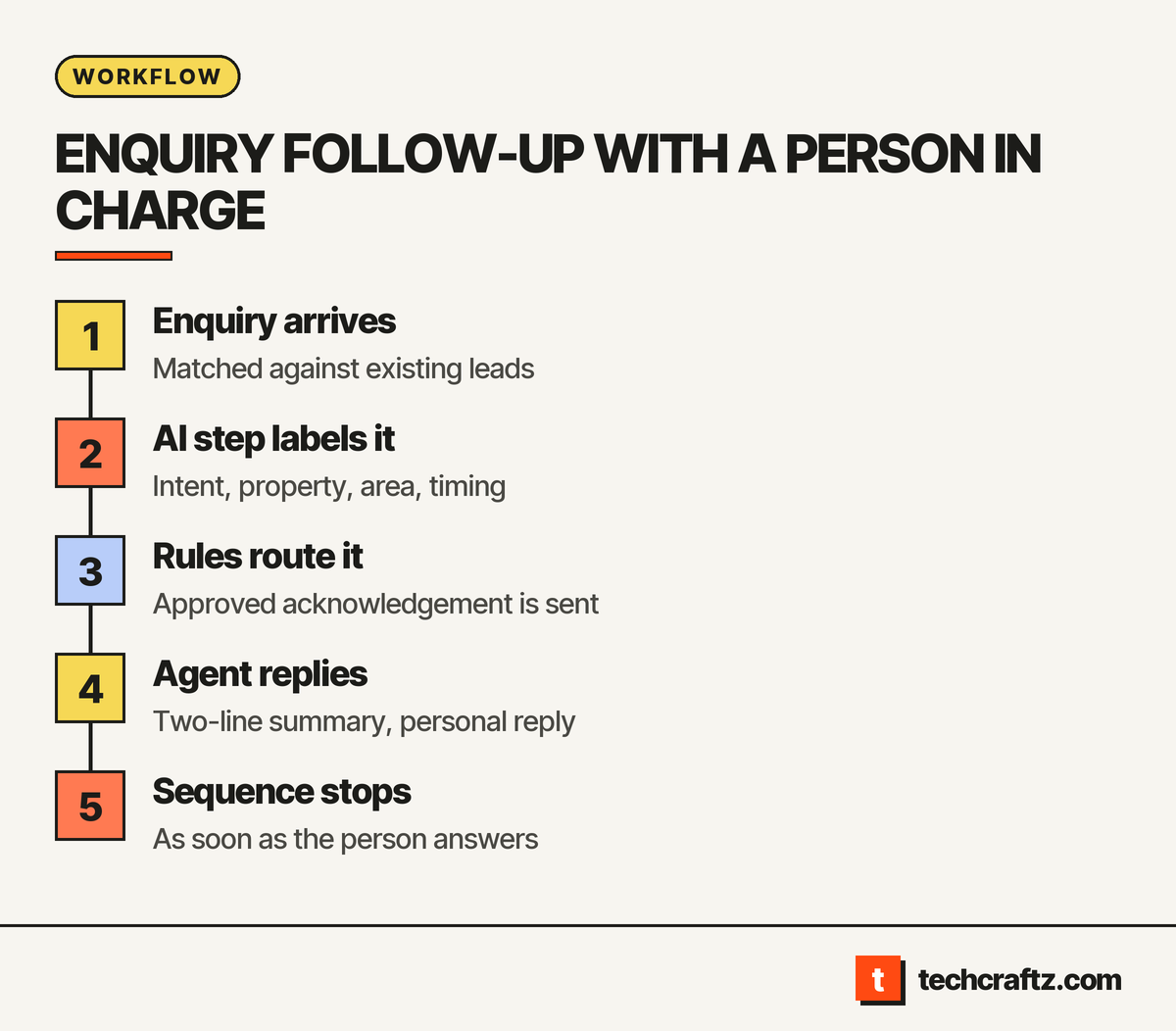
Follow-up is repetitive, time-sensitive and easy to measure, so it passes most of the tests in our guide to AI automation for small businesses. A workable version of AI automation for real estate follow-up looks like this:
- An enquiry arrives from any channel and is matched against existing leads.
- The AI step labels the intent and pulls out the property, area and timing.
- Rules route it to the right agent and send an approved acknowledgement.
- The agent gets a two-line summary and replies personally.
- The follow-up sequence stops as soon as the person answers.
The AI step never states a price, availability or condition that is not in the listing feed. It classifies and drafts. A person decides what is promised.
Listing content from the record, not from memory
A model can write a fluent description of a property it knows nothing about, which is the problem. Generate descriptions only from structured fields in your listing system, then have the listing agent check them against the record. Wrong room counts and invented features are a trust risk. Review the wording too: MindStudio warns that AI-written listing language can drift into steering or exclusionary phrases, so it advises human review.
Where the rules bite in AI automation for real estate
Housing is a regulated field. Four items belong in the scope of any AI automation for real estate agencies:
- Fair housing. In the US, the Fair Housing Act bars housing discrimination because of race, color, national origin, religion, sex, familial status and disability, per HUD. A lead-scoring or routing step must not use those characteristics, and a vendor guide such as MindStudio’s advises testing qualification algorithms for disparate impact. Ask for the test, not the promise.
- Automated decisions. GDPR Article 22 gives people the right not to be subject to a decision based solely on automated processing that produces legal or similarly significant effects, with exceptions and required safeguards such as human intervention. Screening an applicant or declining an enquiry automatically is the kind of step to keep under human control.
- Disclosure. Article 50(1) of the EU AI Act says people interacting directly with an AI system should be informed of it unless that is obvious. If a chat assistant answers listing enquiries, label it.
- Outbound messages. Rules on automated calls, texts and email differ by country. Have them checked before any outbound sequence goes live.
None of this is legal advice. Whether a rule applies to your agency is a question for counsel.
Treat every enquiry as untrusted input
Anyone can type anything into your enquiry form. OWASP’s Top 10 for LLM applications (2025) lists Prompt Injection as LLM01, where user prompts alter the model’s behavior, and Excessive Agency as LLM06, where an LLM-based system is granted too much ability to act. For AI automation for real estate, the practical rules are short:
- The AI step reads the listing feed and the lead record. It cannot export contact lists or open other leads.
- It can send only approved templates, to the address that enquired.
- A message that tries to change its instructions goes to a person, and the attempt is logged.
Build, buy or wire together
Several vendors sell ready-made assistants for agencies. If you run one CRM, one portal feed and a simple routing rule, a vendor product may be enough, and you may not need custom software. Build when you need several data sources behaving as one (listing feed, CRM, calendar, e-signature), routing rules specific to your areas and languages, a review queue and audit log, or control over where lead data is stored. A workflow engine can carry much of that; see how the main options differ in n8n vs Zapier. Our AI automation services page describes what we build.
What to bring to a scoping call
- Every channel enquiries arrive from, and who reads each one now
- Your CRM and how its data can be exported
- Access to the listing feed or the system behind it
- The routing rules you already apply: area, language, property type
- The templates you approve, and who answers after hours
- Your privacy notice wording for enquiry forms
Send the brief, get a written scope
techcraftz puts scope, milestones and the estimate in writing before the first line of code, then hands over the code, the accounts and the keys. For AI automation for real estate, start with one workflow, usually enquiry follow-up. Describe what arrives, who should act and what must never be sent automatically. See how techcraftz works or go straight to the form.
Get a written scope for your first workflow.
Last checked: October 14, 2026. Regulations and vendor guidance change; verify before you commit.
Talk to us about your project
Tell us what you need. We help you scope the build, the milestones and a realistic estimate.
View services