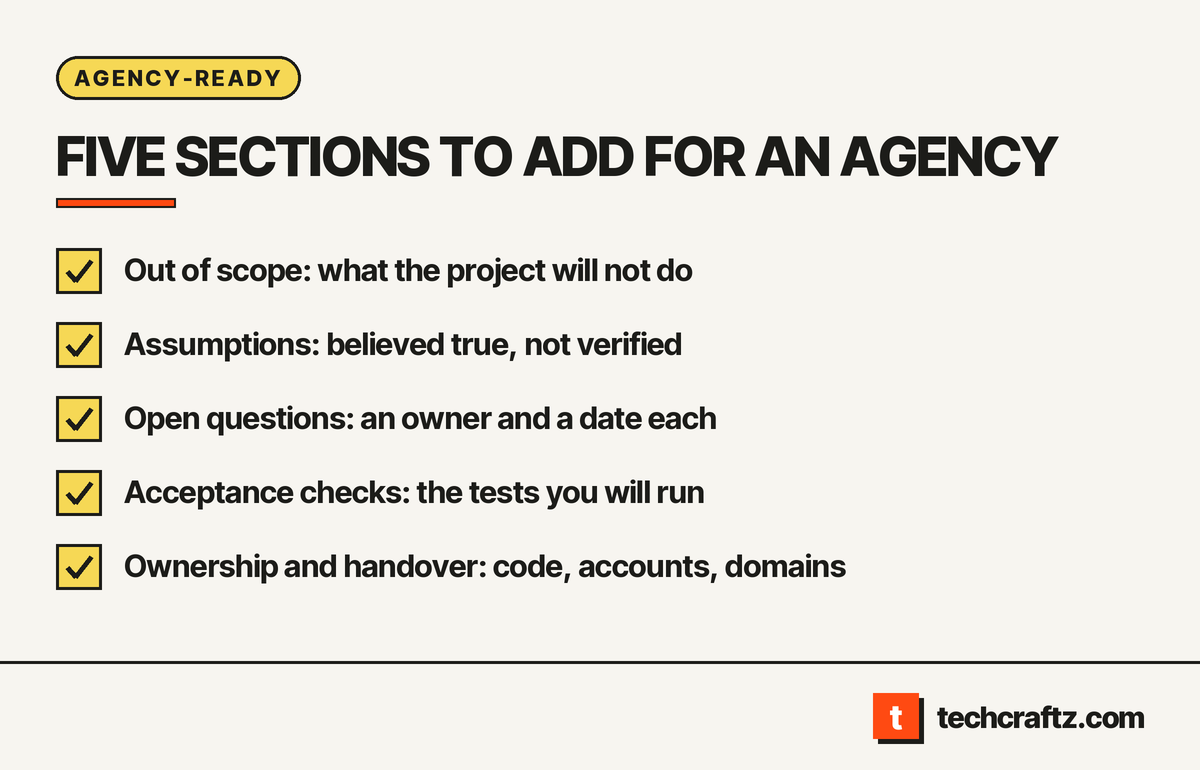
A software requirements document template should let an agency estimate the work and let a developer build it without guessing. The standard outline covers purpose, features and quality attributes. When you are hiring an agency, five more sections decide whether the scope holds up: out of scope, assumptions, open questions, acceptance checks and handover. This guide gives the full outline, explains what to write under each heading and shows how to word requirements so they can be tested.
What a requirements document is for
The IEEE Computer Society describes a software requirements specification as a detailed description of the intended purpose, features and functionality of an application. It guides the development team and, in its words, helps reduce errors and rework later. It should be written in clear language that both technical and non-technical people understand, and it acts like a contract between the sponsor or client and the development team about what the finished product must meet.
It also changes. The same page says the document evolves as details emerge, but a baseline is needed up front to guide the basic architecture and design choices. That is the right expectation: not a perfect document, a firm starting version.
What a standard software requirements document template misses
The IEEE Computer Society lists common sections: introduction and purpose, business requirements, user roles, feature list, user stories or use cases, functional and nonfunctional requirements, interface, performance, security, constraints, external systems, quality assurance and documentation requirements. Asana boils the same ground down to four parts: introduction, system and functional requirements, external interface requirements and non-functional requirements. Perforce frames it as seven steps, from choosing an outline to refining after delivery.
Those are good bones for a product team. They are written for engineers working from a document. A buyer sending a brief to an agency needs more, because the agency must price and commit. We opened four pages (IEEE Computer Society, Perforce, Jama and Asana) and checked their text on 14 October 2026. None used the phrase “out of scope” or “open questions”, and none mentioned handover. Only Perforce mentioned assumptions. IEEE Computer Society and Perforce do cover acceptance criteria, but as a technique or a tip, not as a section to fill in. Treat our five additions as editorial judgment, not as part of any standard.
The software requirements document template: full outline
Copy this outline and fill it in order. Each heading says what to write.
- Purpose and users. The problem in two or three sentences, who has it and what “working” means for them.
- Roles and permissions. Every kind of user, and what each can see, create, change and delete.
- Workflows. For each one: the trigger, the inputs, the rules, the outputs and the exceptions. This is the core of the document.
- Data and integrations. What is stored, where it comes from, which other systems it connects to, and who owns each of those systems.
- Non-functional requirements. Security, privacy, performance, availability, browser and device support, accessibility. Each should be checkable.
- Constraints. Fixed choices you cannot change: a platform, a hosting location, a legal rule, a launch event.
- Out of scope. What the project will not do, written as a list, so “later” is a decision and not a surprise.
- Assumptions. What you believe is true and have not verified, such as “the existing system exports its data”.
- Open questions. What you do not know yet, with an owner and a date for each answer.
- Acceptance checks. The tests you will run to accept each milestone.
- Ownership and handover. Code repository, cloud accounts, domains and documentation in your name from day one.
Sections 7 to 11 are the ones an agency cannot invent for you, and they are where scope disputes start.
Write requirements that can be tested
Whichever software requirements document template you pick, a requirement an agency can price is a statement that two people would check the same way. Compare:
| Weak | Testable |
|---|---|
| The system should be easy to use | A staff user can find a customer by phone number or email from the main screen in a single search |
| Approvals should be fast | An approver sees a pending request in their queue as soon as it is submitted and can approve or reject it from one screen |
| The app must be secure | Each role can reach only the screens listed in the role table, and this is verified by a test per role |
Notice the pattern in the right-hand column. It names a user, an action and an observable result. If you cannot say how you would check a sentence, it is a wish, so rewrite it or move it to open questions.
A workflow entry in the template can be this short. The example is hypothetical:
| Field | Entry |
|---|---|
| Name | Expense approval |
| Trigger | An employee submits an expense |
| Inputs | Amount, category, receipt file, employee, date |
| Rules | The manager approves or rejects. Rejection needs a reason. |
| Outputs | Status change, email to the employee, entry in the report |
| Exceptions | Missing receipt returns the request to the employee |
Label every requirement
If everything is a priority, nothing is. Add a priority column to your software requirements document template and label each requirement must, should or could. WeWeb’s MVP guide describes this MoSCoW approach for cutting a first release down to what solves one real problem. Our guide to building an MVP in eight weeks shows how the cut is made, and the MVP development page covers how we approach it.
What to leave out
- Solutions disguised as requirements. “Use a dropdown” is a design choice. State the need instead, unless the choice is a real constraint.
- Pixel-level layouts. Those belong to the design phase.
- Technology picks. Name a stack only if you have a reason, such as an existing system you must connect to.
Keep it alive after the first version
Treat the filled-in software requirements document template as a baseline with a change log. Each change gets a date, a reason and a note on what it moves: scope, schedule or the estimate. Our overview of the custom software development process shows where the document is used at each stage, from estimate to acceptance.
Let an agency write it with you
You do not have to arrive with a finished software requirements document template. A discovery phase is where an agency turns your brief into this document with you, flags the unknowns and returns a written scope. If you can answer sections 1 to 4 in plain words, you have enough to start.
Send the brief, get a written scope
techcraftz puts scope, milestones and the estimate in writing before the first line of code, then hands over the code, the accounts and the keys. Send the problem, the users and what you already know about integrations. Our custom software development page lists what a build includes, and the techcraftz overview explains how we work.
Get a written scope from your brief.
Last checked: October 14, 2026. Templates and standards change; verify before you rely on them.
Talk to us about your project
Tell us what you need. We help you scope the build, the milestones and a realistic estimate.
View services