WooCommerce vs Shopify comes down to one trade: control or upkeep. WooCommerce is open-source software you host and maintain yourself, so you get the code and the responsibility. Shopify is a hosted platform that runs the infrastructure for you, so you get less upkeep and fewer places to change things. Most WooCommerce vs Shopify comparisons rank them on fees. This one compares who does which job over five years, and where each platform stops.
WooCommerce vs Shopify on ownership, side by side
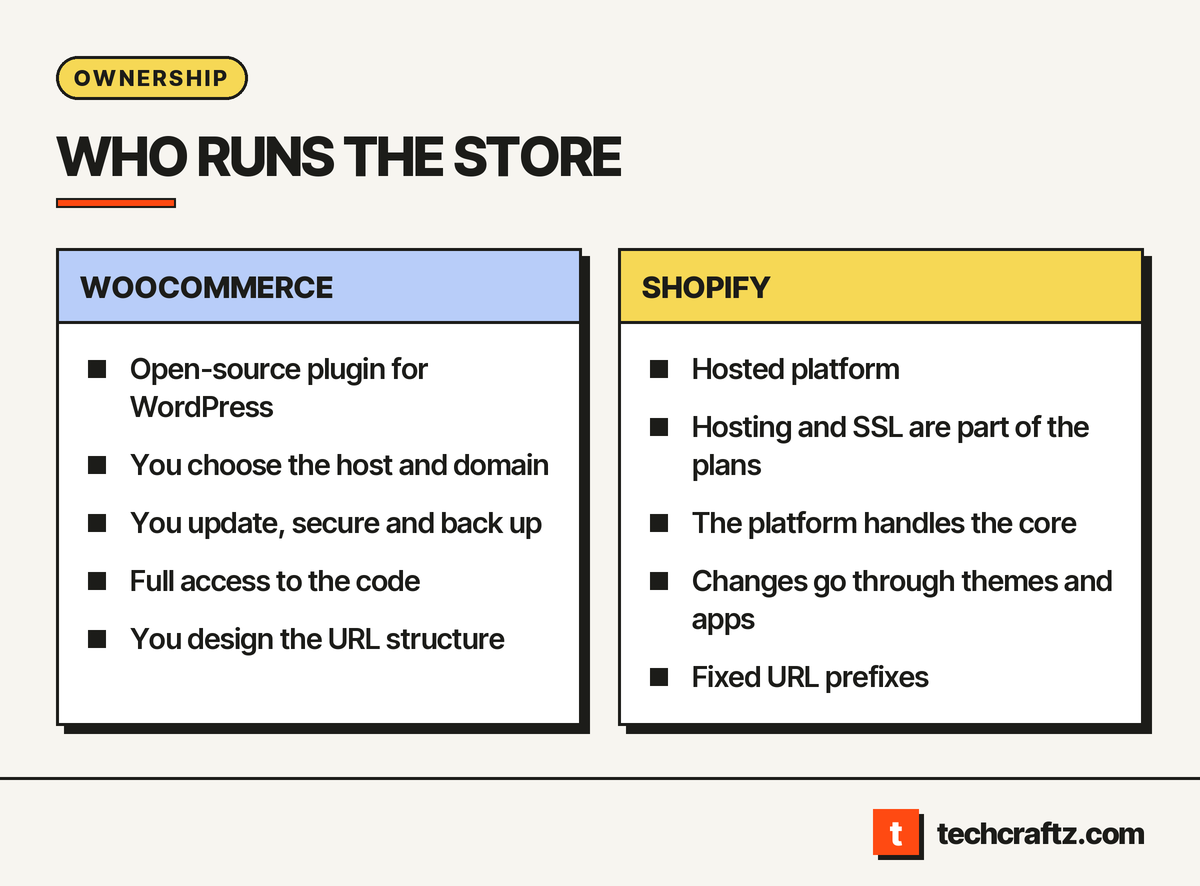
WordPress.org describes WooCommerce as the open-source ecommerce platform for WordPress. WebsiteBuilderExpert, in a comparison updated in March 2026, describes Shopify as an all-in-one website builder and WooCommerce as a plugin that runs on top of WordPress. That difference decides most of the table.
| Question | WooCommerce | Shopify |
|---|---|---|
| What is it? | Open-source plugin for WordPress | Hosted platform (SaaS) |
| Who hosts it? | You choose the host and domain | The platform; hosting and SSL are part of the plans |
| Who updates and secures it? | You, through your host, developers and security plugins | The platform handles the core; you manage apps |
| Code access | Full: hooks, filters, REST API, webhooks | You customize through themes and apps, not the core |
| URL structure | Open: you design it | Fixed prefixes such as /products/ and /collections/ |
| Extension support | From each plugin vendor | From each app vendor |
| Your data | Yours; WordPress.org says you can export it to any platform | Check what the platform lets you export before you commit |
In the WooCommerce vs Shopify comparison above, the first four rows come from WordPress.org, WebsiteBuilderExpert and the agency Presta. The URL row is reported by both Presta and WP All Import, which sells a WordPress plugin, so treat it as a description by interested parties and check it yourself.
Five years of ownership, task by task
Nobody has published a neutral five-year study of WooCommerce vs Shopify, so this table is a planning view built from the duties the sources describe. It is our reading, not a measurement.
| Period | WooCommerce: your jobs | Shopify: your jobs |
|---|---|---|
| Launch | Pick host and domain, install and configure plugins, set up SSL and security | Choose a theme, install apps, configure the store |
| Years 1 to 2 | Apply core, plugin and theme updates; watch for conflicts; keep backups | Review app list; keep the theme and apps current |
| Years 3 to 4 | Audit plugins, retire what is unused, revisit hosting as traffic grows | Audit apps for overlap, check the theme still fits your needs |
| Year 5 | Decide: keep maintaining, rebuild or move | Decide: stay within the platform or outgrow it |
Presta frames the WooCommerce side as a “maintenance tax”: a major WordPress core update can still conflict with legacy plugins, which is why it recommends testing changes in a staging copy first. For Shopify, the same source says apps rarely break when the platform updates, because Shopify controls the API, but warns that stacking apps creates its own bloat. Both are agency opinions, not measurements. Our article on technical debt explains why a growing pile of add-ons becomes work later.
WooCommerce limits
- Upkeep is yours. WebsiteBuilderExpert notes you are responsible for the host, domain, plugins and security choices. Support for a plugin comes from that plugin’s vendor, so a problem across two plugins can bounce between them.
- Moving host has side effects. WebsiteBuilderExpert warns that changing WooCommerce hosts can cause downtime that temporarily affects SEO.
- Plugin conflicts. Presta describes conflicting plugins that make safe updates hard on older stores.
- Performance depends on your setup. The platform does not set the ceiling; your hosting and plugins do.
- Less is built in. WebsiteBuilderExpert notes that WooCommerce has no built-in email marketing, so you add a plugin, and that its built-in shipping is basic until you add more.
Shopify limits
- You do not own the core. Presta puts it plainly: you do not own the core code or manage the database or servers.
- Fixed URL structure. Presta reports a fixed structure with prefixes like /products/ and /collections/, and WP All Import says Shopify enforces subdirectories such as /products/ and restricts a custom URL hierarchy, so you cannot design your own. For many stores that is a guardrail; for content-led stores it is a constraint.
- Customization goes through the platform. What the theme and apps cannot do, you cannot easily do.
- App sprawl. Each app adds a recurring dependency, so audit them.
- SEO control is narrower. WebsiteBuilderExpert praises Shopify for integrated SEO tools but notes that, because they are baked in, you have less control over technical adjustments.
Reading the vendor comparison pages
Two of the top results are vendor-owned. woocommerce.com argues that Shopify does not add up, and shopify.com has a section arguing that WooCommerce’s zero licence price hides other costs. Both are fair to read for how each side frames itself, and neither is evidence. Review sites differ too: look for stated test methods and a visible update date, as WebsiteBuilderExpert provides. We deliberately leave fees out of this article. They change often, and your volume and payment provider decide them more than the platform does. Ask each platform for current terms in writing.
Choosing between WooCommerce and Shopify
A WooCommerce vs Shopify decision is easier when you name who owns maintenance.
Choose WooCommerce when:
- Your store is content-led and you want WordPress-level control of structure and metadata.
- You need custom logic and want direct access to the code.
- You have a developer or agency to own updates, backups and security.
Choose Shopify when:
- Nobody on your team wants to run servers, patches or staging environments.
- The standard store flow covers your needs and speed to launch matters.
- You prefer a single vendor answering for hosting and the checkout.
If nobody will own maintenance, the self-hosted route is a risk whatever its flexibility. If you need a structure the platform forbids, the hosted route is a risk whatever its convenience. Name the owner and the constraint before you pick.
Switching later
A WooCommerce vs Shopify choice is also a choice about how you leave. Leaving is part of ownership. WebsiteBuilderExpert says moving a store between the two platforms is rarely quick, given the amount of content and product files involved. Options include a migration app, a professional, or a manual export and import. Plan the exit when you choose: keep product data clean, document your URL structure, and keep redirects in mind, because changing platforms often changes addresses.
The case for neither
Some businesses outgrow both: order flows that follow unusual rules, deep links to an ERP, or a catalogue model neither handles cleanly. At that point the question becomes build versus buy, which our guide to when custom software beats off-the-shelf walks through. A custom storefront is a larger project with its own written scope, as shown in the custom software development process, and it is not the right answer for most stores.
Send the brief, get a written scope
techcraftz puts scope, milestones and the estimate in writing before the first line of code, then hands over the code, the accounts and the keys. For Shopify work, see our Shopify development page. For something neither platform covers, see custom software development. Send the brief or read more about techcraftz.
Last checked: October 14, 2026. Platform terms and features change; confirm current details with each vendor before you decide.
Talk to us about your project
Tell us what you need. We help you scope the build, the milestones and a realistic estimate.
View services