Headless WordPress means WordPress keeps the content and the editing, and a separate front end, usually built in a JavaScript framework, fetches that content through an API and draws the pages. For most single websites it is overkill. Automattic, the company behind WordPress.com, says the majority of the time it is probably not the right solution. It pays off when one content source has to feed several front ends, or when a team already runs a JavaScript application in production. This guide covers both cases, what breaks first, and a test for choosing. Sources were checked on October 15, 2026.
Headless WordPress, defined
In a standard install the theme and the content system are one unit: editors write in WordPress and PHP templates render the pages. In a headless setup the presentation layer is removed. WordPress remains the back end for posts, pages, media, users and permissions, and exposes them as JSON through the built-in REST API or, with a plugin such as WPGraphQL, through GraphQL. A separate application, for example one built on Next.js, requests that content and renders it.
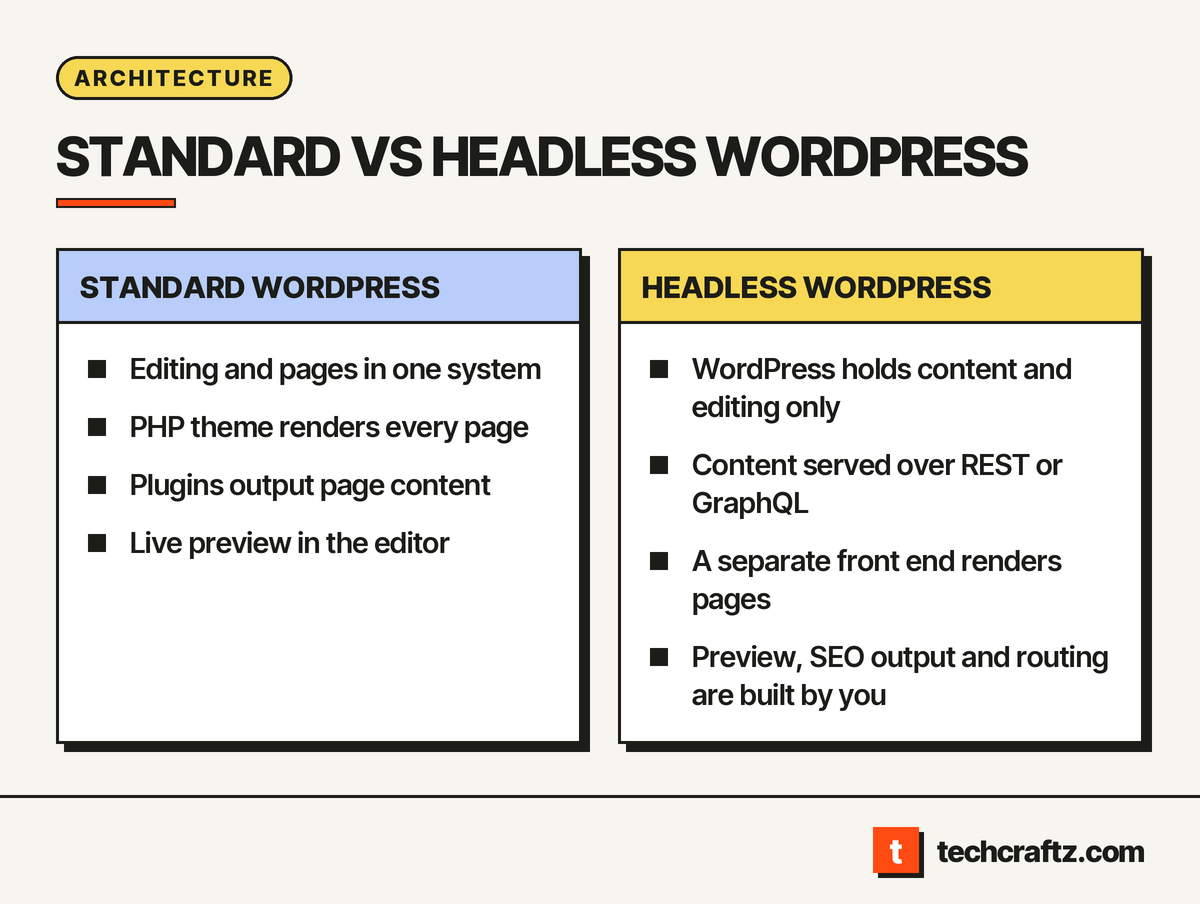
Two terms get mixed up. WP Engine separates them: in a headless-only setup you lose the traditional theme-based display, while a decoupled setup can still offer one alongside API access. In casual use the two words are often swapped.
One note on tools. Gatsby’s documentation still describes a headless WordPress setup with Gatsby, but Automattic says Gatsby is no longer actively maintained and that Next.js is the option still widely used for decoupled builds. Check the maintenance status of any framework before you commit a project to it.
The case for headless WordPress
The sources agree on a short list of real reasons.
- One content source, several destinations. WordPress VIP, which sells enterprise WordPress hosting and so has an interest in the headless case, lists a website, a mobile app, in-product content and a display network fed from one story. Automattic names retrofitting a standard CMS under several existing front-end systems.
- A front end that no theme can give you. WordPress VIP says headless fits when your front end needs a framework a theme cannot provide. Automattic ties this to interactivity needs that core cannot meet.
- A team that already owns a JavaScript front end. WordPress VIP is blunt: you need a front-end engineering team that owns a JavaScript application in production, covering framework, build pipeline, routing, rendering strategy and the SEO surface the theme used to hold.
If one of these describes you and you can staff it, headless WordPress is a reasonable architecture. If none does, read the next section before you spend anything.
The case against headless WordPress
Three points weaken the case for decoupling.
First, interactivity. The Interactivity API arrived in WordPress 6.5 and is used in core blocks such as Search, Query and Navigation. Its documentation lists instant navigation, instant search, carts and checkouts as examples. Automattic says that, with it, decoupling for performance or interactivity is no longer necessary in many cases.
Second, apps. If you need a mobile app to read the same content, Automattic points out that a traditional WordPress site can sit beside an app that uses the REST API, with the content still managed in the same place. That is not headless, and it avoids building a second front end.
Third, the platform itself says so. The WordPress REST API handbook states that you should not feel pressured to use the REST API if your site is already working the way you expect, and that you do not need it to build a theme or a plugin.
WordPress VIP’s own “single stack is enough” list is a useful filter: the website is the only destination, editorial speed matters more than front-end flexibility, and nobody has the capacity to own a second runtime for the next few years. If that is your situation, headless WordPress adds work and returns little.
The first four things that break
The same failures recur across the sources. Audit them before you decide, because each is a build task, not a setting.
- Preview. WordPress VIP calls broken preview the most common reason a working launch gets called a failure. Automattic and WP Engine agree that the site editor and live preview are lost. It can be rebuilt: Next.js documents a Draft Mode in which a route handler checks a shared secret and the page then reads the latest draft, but that route and its wiring are yours to write and test.
- Plugins that render output. WordPress VIP says anything that produces output through a shortcode or a dynamic block render callback stops feeding your front end, because that code runs in the theme layer you no longer call. Plugins that add data, fields or editorial workflow keep working. Audit your plugin list against that split.
- SEO. Metadata, canonicals, redirects, structured data and sitemaps stop being the theme’s job and become your front end’s. WordPress VIP says the sites that lose traffic are the ones that treated SEO as a post-launch task.
- Layout changes. Automattic describes the client who wants a new page layout and now has to file a ticket, where before they could assemble one from a library of patterns and publish.
None of these is a reason to avoid headless WordPress. All of them belong in the scope, not in the surprises.
Two systems to own
A headless build is two applications. Automattic lists the consequences: setup and maintenance are more complex, you work in two languages, PHP on the back end and JavaScript on the front, hosting is usually separate for the front end, and updates take longer because layout changes now go through developers. WordPress VIP puts the operational side in one line: every incident starts with a question about which half broke.
Strapi, which sells a purpose-built headless CMS, argues that WordPress converted to headless may need extra configuration and maintenance, and that a native headless CMS can be a better fit for performance-led projects. That is a vendor’s view, as the WordPress ones are, but it raises a fair question. If you are building a front end from scratch anyway, is WordPress the right content store, or only the familiar one? Editors who already know WordPress are a legitimate reason to keep it. Our article on web app vs website covers where the line between a content site and an application sits.
A test: single stack, hybrid or headless
Adapted from WordPress VIP’s three-way framing, with the wording ours:
| If this is true | Lean toward |
|---|---|
| The website is the only destination; editors need speed more than front-end freedom; no one has the capacity to own a second runtime | Single stack, a standard WordPress build |
| The marketing site changes daily and should not wait on a deploy, but an app or product surface needs its own release cycle | Hybrid |
| One content source feeds a site, an app and other channels; the front end needs a framework a theme cannot give; you already run a JavaScript front end in production | Headless |
If you land in the middle, ask what the extra moving parts buy you that a standard build cannot do.
Phasing the move if you do go headless
WordPress VIP says most teams phase it, taking one template family at a time instead of switching the whole site at once. Automattic suggests a test site first if your team has not done it before. Put together:
- Audit plugins against the output-versus-data split above.
- Build preview before launch, not after.
- Specify metadata, canonicals, redirects, structured data and sitemaps up front.
- Migrate one template family, check it, then the next.
- Agree who owns each half and who is called when an incident starts.
Send the brief, get a written scope
techcraftz writes scope and milestones before the first line of code, then hands over the code, the accounts and the keys. If you are weighing a standard build against a decoupled one, we will say which fits and why, in writing, even when the answer is the simpler one. See our WordPress development page, our web application development page and how we work. For the wider build picture, read the custom web application guide. Get a written scope.
Last checked: October 15, 2026. Frameworks and platform features change; verify before you plan.
Talk to us about your project
Tell us what you need. We help you scope the build, the milestones and a realistic estimate.
View services