What is a web application vs website? A website is something people read. A web application is something people use: they log in, create or change data, and get an experience that depends on who they are. Most business sites are websites, most internal tools are web applications, and many projects are both. This guide gives a plain test, a comparison table, the hybrid case and the signs that a website has outgrown being one.
What is a web application vs website? The plain test
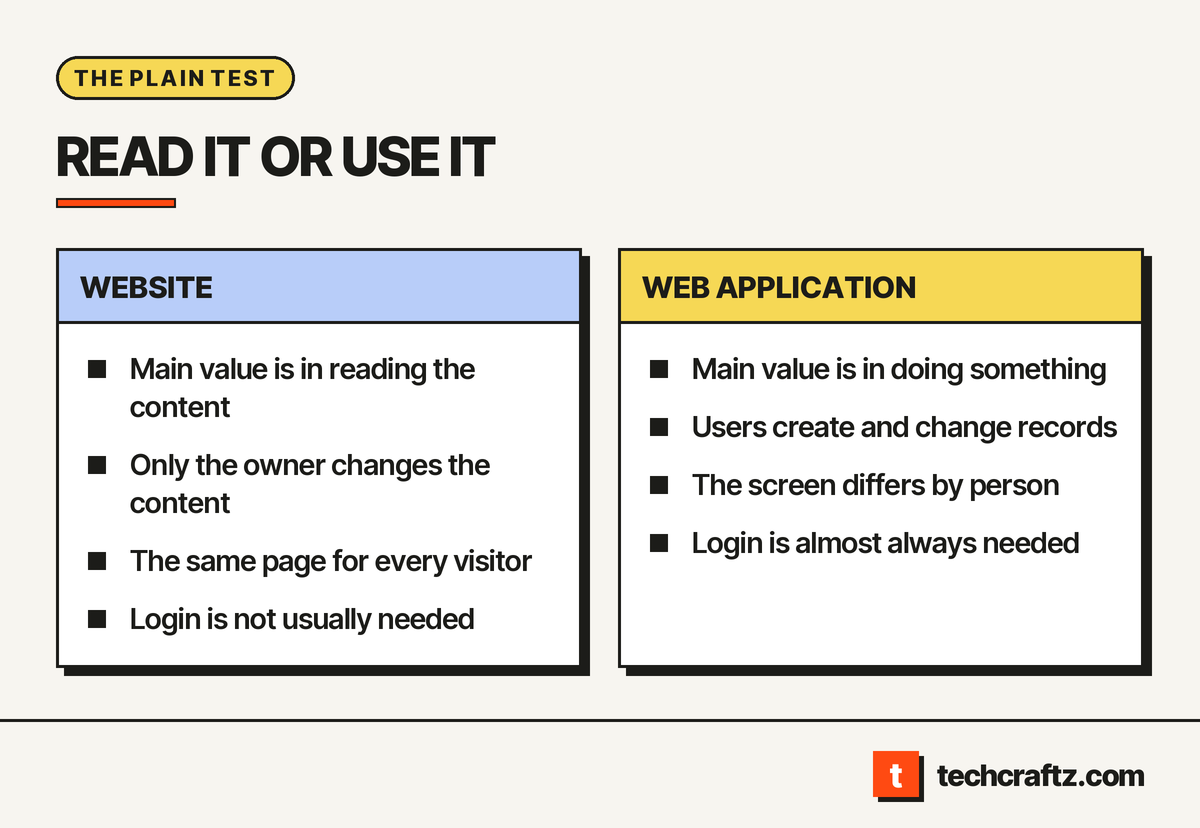
Elementor offers a one-line test: if the primary value is in reading the content, it is probably a website, and if the primary value is in doing something, it is a web application. A bakery’s page with a menu, opening hours and a contact form is a website. A portal where customers upload documents, staff review them and managers approve them is a web application.
Bubble describes the same split with traits. Websites usually offer limited interactivity, have content that only the owner controls and show the same thing to every visitor. Web apps usually have user accounts, user-created content and personalized experiences. Its examples: TechCrunch is a website, Gmail is a web app.
Both guides come from vendors that sell site and app builders, so read them as clear definitions, not as neutral advice on what you should build.
Three questions that decide it
When people ask “what is a web application vs website”, they usually want a verdict for their own project. Three questions give one:
- Do people log in? If yes, you are building an application.
- Do users create or change records that matter to them or to your staff, such as bookings, requests or documents?
- Does the screen differ by person? Two users opening the same page and seeing different things points to an application.
One “yes” is enough to treat the project as a web app for planning purposes. The table shows the usual differences.
| Website | Web application | |
|---|---|---|
| Main purpose | Inform, market, display content | Provide a service, complete a task |
| Who changes content | The site owner | Users, through their actions |
| Login | Not usually needed | Almost always needed |
| Experience | The same for everyone | Personal to each user |
| Data | Pages and posts | Records with rules and permissions |
| Ongoing work | A defined project, then updates | Continuous and iterative |
The last row comes from Elementor’s comparison table, which describes website development as faster and defined, and application development as long-term, continuous and iterative.
The hybrid in the middle
In practice, the question “what is a web application vs website” has a hybrid answer. Elementor’s example is an online store. The homepage, about page, blog and product descriptions are the website part. The cart, checkout, account dashboard with order history and review system are the web application part. Bubble makes the same point: HubSpot, for instance, has a static marketing site and a separate app that users log into.
So the useful question is not which one you have. It is which parts of your project are applications, because those parts carry the cost, the risk and the upkeep. For an online store, that decision often starts with the platform, which we compare in WooCommerce vs Shopify.
Web apps can be installed too
A web application does not have to feel like a lesser version of a mobile app. web.dev defines Progressive Web Apps as web apps built and enhanced with modern APIs, reaching any web user on any device with a single codebase. Its three pillars are capable, reliable and installable. MDN describes a PWA as an app built with web technologies that provides an experience like a platform-specific app: it can be installed, work offline and run in the background.
Installable or not, such an app stays on the application side of the line. That matters when you weigh a web app against a native mobile app. A single web codebase may cover the need, though some device capabilities are still out of the web’s reach, as web.dev itself notes. Our article on cross-platform app development covers the wider mobile decision.
Signs your website has outgrown being a website
Competing guides answer “what is a web application vs website” but stop there. We checked four pages (GeeksforGeeks, Bubble, Elementor and Hostinger) on 14 October 2026 and found none that lists signs a site has outgrown its type. Bubble’s FAQ says a website can become a web app by adding accounts, a database and logic, but not when to do it. These signs are our editorial judgment:
- Staff re-type data from your site’s forms into another system every day.
- Customers email documents that your team then files by hand.
- You keep adding plugins to give different people different access.
- Requests need statuses, approvals or reminders that the site cannot track.
- Your website now has to talk to internal systems, not only publish pages.
A useful way to see it is as three steps. A content site on a CMS is fine for publishing. A CMS with plugins can handle forms and simple memberships, which our WordPress development page covers. When roles, workflows and integrations dominate, the project is a web application, and a custom build is likely to be cleaner than a stack of plugins. You may not need that step, and a good site with a few plugins often is the right answer.
What changes when it is an application
Once users have accounts and records, three things move from optional to required:
- Access control. OWASP Top 10:2025 lists Broken Access Control as risk A01. Who can see and change what must be designed and tested.
- Privacy. Personal data in accounts brings data-protection duties. Whether a law applies to you is a question for counsel.
- Upkeep. Dependencies, hosting and fixes continue after launch. Plan for the life of the app, as described in our guide to custom web application development.
A short decision list
- Mostly reading, with a contact form: a website.
- Mostly reading, with a few interactive features: a CMS site with plugins.
- Logins, records and per-user screens: a web application.
- A mix: a website for the content, an application for the logged-in parts.
Whatever the answer to “what is a web application vs website” for your project, write it into the scope: which parts are pages and which are applications.
Send the brief, get a written scope
techcraftz puts scope, milestones and the estimate in writing before the first line of code, then hands over the code, the accounts and the keys. Describe what your users need to do on the site, and we will separate the pages from the application. See the techcraftz overview for how we work.
Get a written scope for your site or web application.
Last checked: October 14, 2026. Platform guidance changes; verify before you commit.
Talk to us about your project
Tell us what you need. We help you scope the build, the milestones and a realistic estimate.
View services