To outsource app development safely, hand over the build and keep the keys. The vendor writes the code, tests it and prepares releases. You keep the store accounts, the signing keys, the backend accounts and the product decisions. A mobile app adds a problem that a website does not have: it lives inside Apple’s and Google’s ecosystems, under developer accounts that someone has to own. This guide covers that split. For the general mechanics of vendor control, read our guide to outsourcing web development first.
What to hand over and what to keep when you outsource app development
Most advice on how to outsource app development stops at choosing a vendor. The harder question is what the vendor touches and what stays in your name. Use this table as a starting position for the contract.
| Piece | The vendor does | You hold |
|---|---|---|
| Product decisions and acceptance | Proposes, estimates, demonstrates | The decision and the sign-off |
| App code (iOS, Android or cross-platform) | Writes and reviews it | The repository, in your organization |
| Backend, API and database | Builds and documents them | The cloud and database accounts |
| Apple and Google developer accounts | Works inside them as an invited user | The account holder role, in your name |
| Signing keys and certificates | Uses them through an agreed process | Admin access and a recovery path |
| Store listing, screenshots, privacy answers | Drafts them | Approval and ownership |
| Analytics, crash reporting, push services | Sets them up | The projects and logins |
The right-hand column is what is hard to get back later. A vendor can be replaced. An app published from the wrong account is a transfer project.
Open the store accounts in your name before you outsource app development
Apple’s enrollment page says you can enroll as an individual or as an organization. An organization must be a legal entity that can enter contracts with Apple, and Apple does not accept DBAs, fictitious business names, trade names or branches. It also asks for a D-U-N-S Number, a work email on the organization’s domain and a public, working website. The name you enroll under is shown as the seller name of your apps on the App Store.
That last point is the practical one. If a vendor publishes your app from its own account, the store shows the vendor as the seller. It follows that your customers, your reviews and your listing sit under someone else’s name.
Google Play has two account types, personal and organization, with the same functionality. Google says to choose an organization account for commercial or professional activity, and an organization account needs a D-U-N-S number. Google says you should choose an organization account if you provide financial services, health apps or government apps, among other cases.
Personal accounts have an extra hurdle. For personal accounts created after November 13, 2023, Google requires a closed test with at least 12 testers opted in for 14 continuous days before you can apply for production access. That page covers personal accounts only. Checked October 14, 2026. Rules like this change, so ask the vendor to confirm the current requirement before you plan a launch date.
Can you fix a wrong account later? Both stores document app transfers. Apple says a transferred app keeps its Bundle ID, reviews and ratings, and users keep receiving updates, but the process has extra steps for apps using features such as push notifications, Sign in with Apple or iCloud. Google lists conditions for transferring apps between developer accounts too. Possible, but it is a project with its own checklist. Start in the right account instead.
One question settles this early: which account will the app be published from? If the answer is the vendor’s, ask for the transfer steps in writing, or change the answer.
Know who holds the signing keys
An Android app is signed before users receive it. Google’s Play App Signing documentation describes two keys.
- Upload key. You (or your team) hold it, in a Java keystore. You sign each release bundle with it before uploading. If it is lost or compromised, Google can reset it.
- App signing key. Held by Google Play when you enroll. Google signs the APKs delivered to users with it. If you manage this key yourself without Play App Signing and lose it, it cannot be reset.
Setting up Play App Signing requires admin permission in the console. That is another reason to hold the admin role yourself. Ask the vendor three things: who generates the upload key, where the keystore is stored, and who on your side is the named custodian. Ask the same question for iOS: which account holds the certificates and profiles used to sign builds?
Pick the model, then write down who owns testing when you outsource app development
Saigon Technology, an outsourcing vendor, compares three models for anyone about to outsource app development. Its table, which we read as one vendor’s view and not a standard, says that under staff augmentation you own delivery and QA. Under a dedicated team delivery is shared and QA ownership “must be stated”. Under project-based delivery the vendor owns both. It adds that IP belongs to you by default under augmentation, and under the other two models only if the contract says so.
The same guide makes a point worth repeating for apps: mobile testing is broader than web testing, and it is the first line clients cut. Your contract should name the test scope in plain terms:
- the operating system versions the app must support,
- the device classes to test on, and who supplies them,
- whether automated regression tests are a deliverable,
- who signs off a release candidate.
If nobody owns QA, nobody does it.
Track platform deadlines in the contract
Stores change their rules on a schedule, and an outsourced team can miss a deadline that neither side wrote down. A current example: Google Play requires that from August 31, 2026, new apps and app updates target Android 16 (API 36) or higher, with lower targets for Wear OS, Android TV, Automotive and XR apps. Existing apps that target API 34 or lower are only available on devices running the same or a lower Android version. Google also said developers could request an extension to November 1, 2026 (checked October 15, 2026).
If your app was built against an older target, an update is not optional. Add one clause: the vendor tracks store requirements, tells you about each change in writing, and plans the work before the deadline.
Run a handover drill before you need one
A contract says you own the app. A drill proves you can operate it, which is the real test when you outsource app development. Run this once around the middle of the project and again before the final milestone. It is our suggestion, not a standard, and it takes an afternoon.
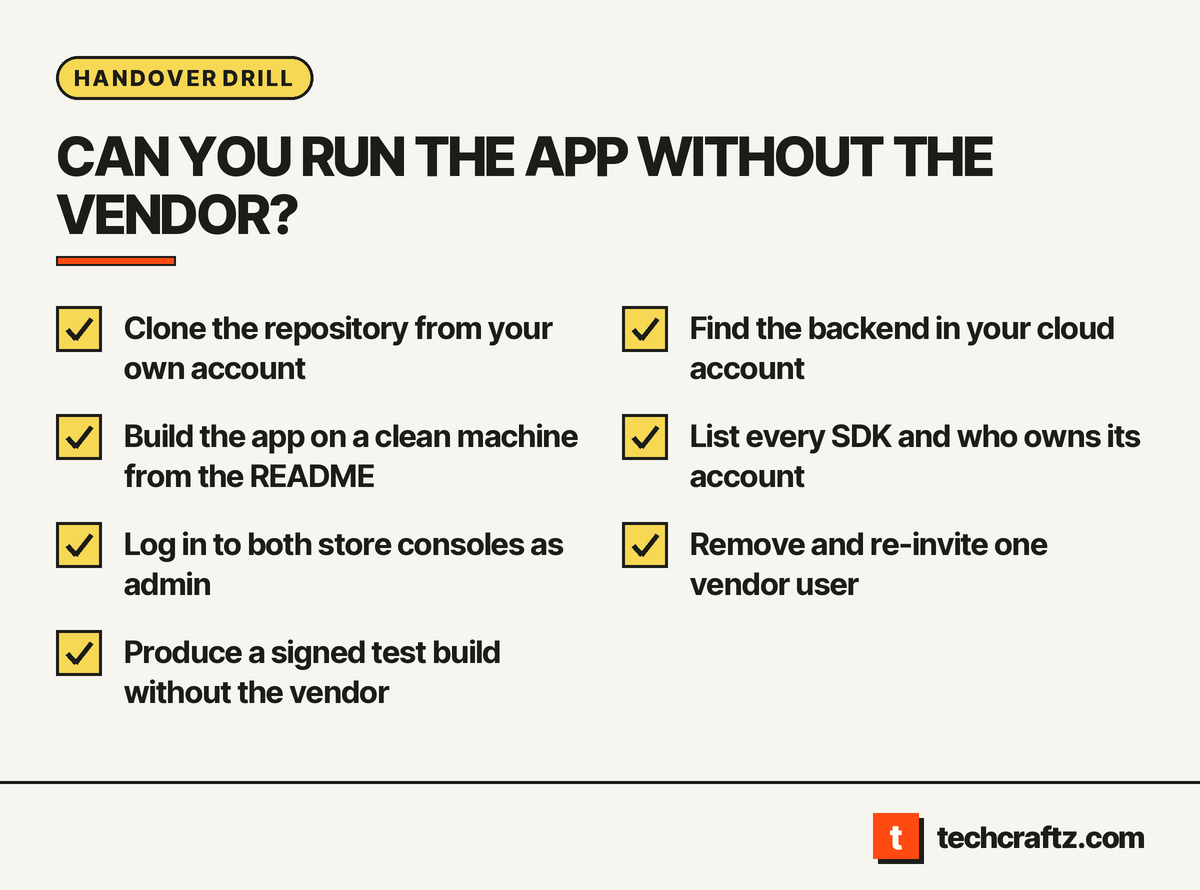
If any step needs the vendor to be online, you have found a dependency. Fix it while the relationship is good.
Contract clauses that matter for apps
Beyond the usual scope and payment terms, a contract to outsource app development should cover these.
- IP assignment that names source code, build scripts, design files and store assets.
- Third-party components. A list of SDKs and services the app uses, with the licence terms and who owns each account.
- Build delivery. A test build at every milestone, installable by you.
- Account renewals. Who renews developer memberships and keeps them active.
- Post-launch support. How long the vendor handles operating system updates and crash reports, and what counts as a bug versus a new feature.
- Exit help. What the vendor does if you move the app to another team: handover notes, a call, access cleanup.
Our general outsourcing guide explains the contract types and risks in more depth.
Hand over the build, keep the keys
When you outsource app development well, you decide, approve and hold the accounts. The vendor builds, tests and documents. Everything in this article reduces to one test: could you replace the vendor in a week without losing the app?
techcraftz puts scope, milestones and the estimate in writing before the first line of code, then hands over the code, the accounts and the keys. For the build itself, see our mobile app development page. If a distributed team suits you, read how an offshore software development engagement runs, or see how we work. When you are ready, send the brief. You can also read more about techcraftz.
Last checked: October 15, 2026. Store rules change; verify them before you plan a launch.
Talk to us about your project
Tell us what you need. We help you scope the build, the milestones and a realistic estimate.
View services